
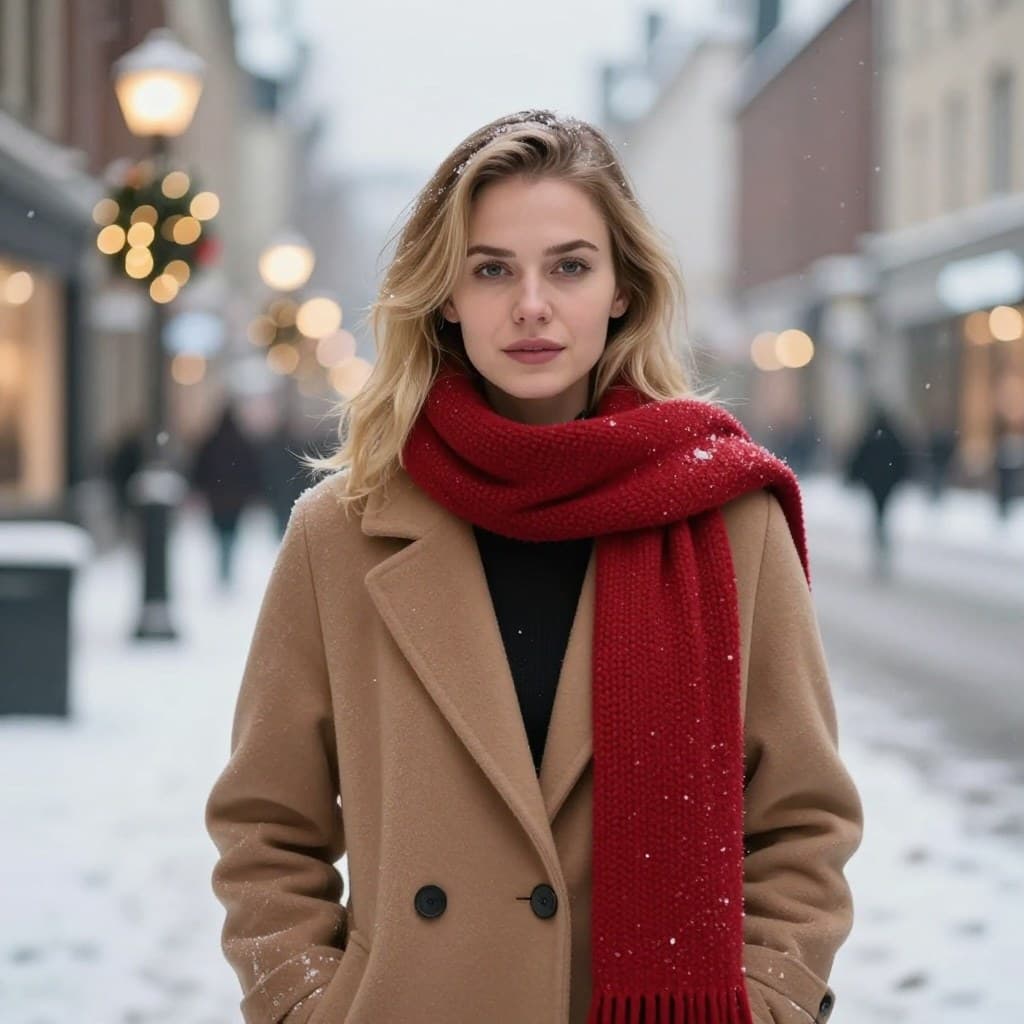
The Snowy Street (Female) template, before your face is added.
Christmas & Holiday template
Snowy Christmas Street Photo
Snowy Street puts you on a city street at dusk, with snow falling and Christmas lights in the shop windows, wrapped in a camel coat and a red scarf. It's the winter photo you meant to take but never did.
Use this templateWorks in your browser. See more before-and-after examples
- Template
- Snowy Street (Female)
- Category
- Christmas & Holiday
- Style
- Winter evening in town
What's in the Snowy Street (Female) template
A woman with shoulder-length blonde hair stands on a snow-covered street in a camel wool coat and a chunky red scarf. Behind her, blurred shopfronts glow with holiday lights and a few people walk through the snow. She looks straight at the camera with a calm expression.
Snowy Street (Female) before and after

 Real results from Face Swap AI. The faces swapped in are AI-generated sample faces, not customers' photos. More before-and-after examples.
How to use the Snowy Street (Female) template
- Open this template in the studio. It's already selected.
- Open the Christmas & Holiday category and tap Snowy Street (Female).
- Tap Your face to add a clear selfie or take one with your phone, then tap Swap faces. You sign in the first time you swap.
- Your photo is ready in seconds. Download it or share it.
What people use it for
- A winter profile picture
- A holiday card with a snowy scene
- Instagram posts for the Christmas season
Tips for a natural result
- A calm, closed-mouth expression matches the template best.
- Take your selfie in daylight by a window. The template's light is soft and cool.
- Hair worn down blends best with the template's shoulder-length hair.
More advice in how to make a face swap look realistic.
Questions
Is the snow real?
The template is a generated photo of a snowy street, so you get the winter scene without going outside. Only your face comes from your selfie.
Is there a men's winter template?
Yes. Christmas Market (Male) puts you in a navy peacoat at an evening Christmas market with falling snow.
More Christmas & Holiday templates

Christmas Tree Portrait for Women
Christmas Tree (Female)

Christmas Tree Portrait for Men
Christmas Tree (Male)

Christmas Market Photo for Men
Christmas Market (Male)

Ugly Christmas Sweater Photo for Women
Ugly Sweater (Female)

Ugly Christmas Sweater Photo for Men
Ugly Sweater (Male)

New Year's Eve Party Photo for Women
New Year's Eve Glam

New Year's Eve Tuxedo Photo for Men
New Year's Eve Tuxedo
All Christmas & Holiday templates →
Related guides

Christmas card face swap
Make a Christmas card photo with your face: a tree portrait, a snowy street, an ugly sweater or New Year's Eve glam. One selfie, ready to print or send.
Birthday face swap ideas
Birthday face swap ideas: make the birthday person royalty, an award winner or a movie star. One photo, ready in seconds to share or print.
8 tips for a realistic face swap
Why some face swaps look fake and how to fix it: angle, light, sharpness, expression, hair, glasses and skin tone. Eight tips for any AI face swap app.